v1.0.10 · MIT licensed

v1.0.10 · Free & open source

Quiet surfaces.
Loud data.

A calm, fast desktop client for PostgreSQL, MySQL, SQLite and MongoDB. Query, edit and map your data, and let your AI agents in on your terms.

macOS · Windows · Linux, on x64 and ARM64

Engines
8
Platforms
3
Credentials
In your system keychain. Nothing leaves until you connect.
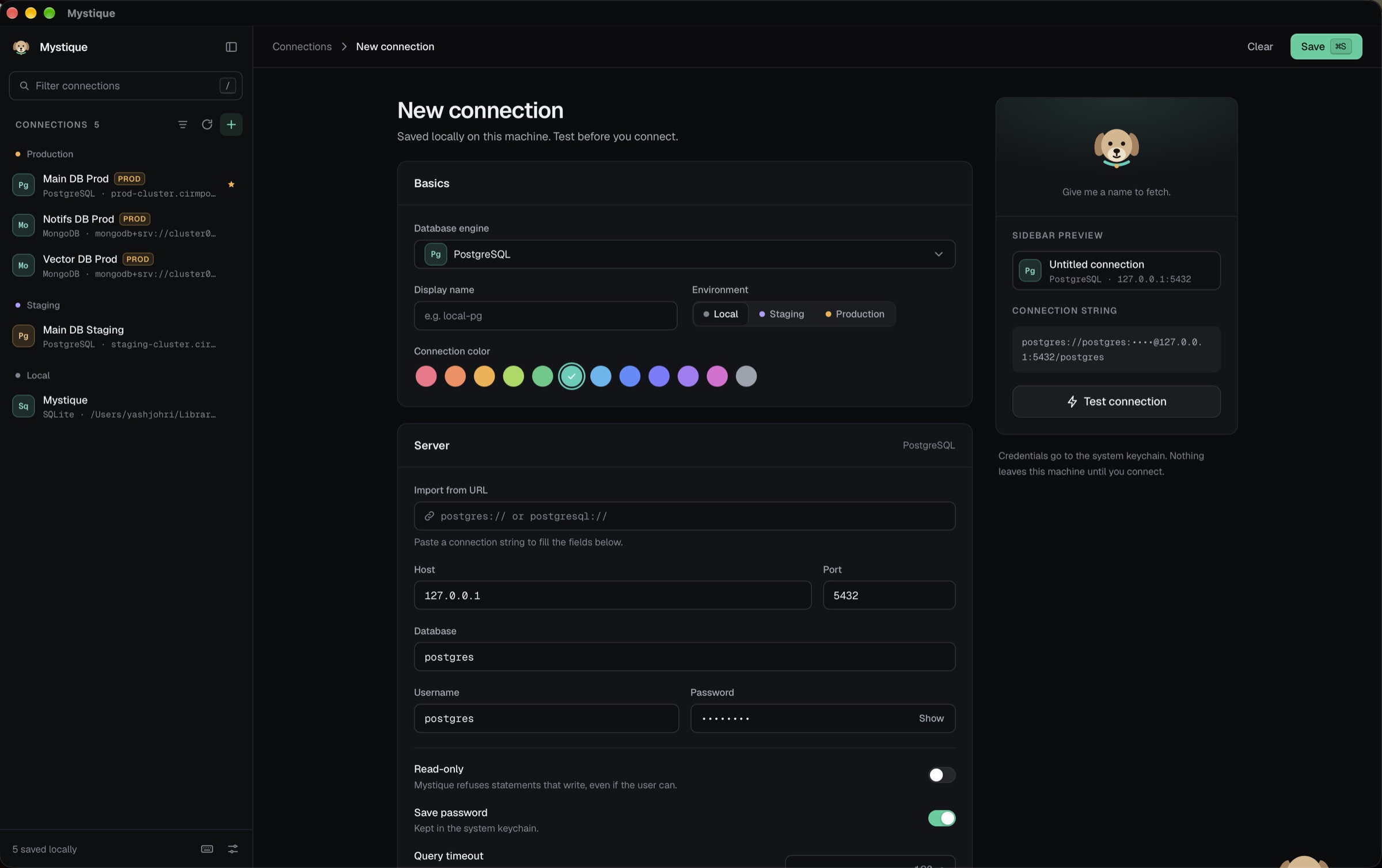
Creating a PostgreSQL connection in Mystique, with saved connections grouped by environment in the sidebar
  • PgPostgreSQL
  • CrCockroachDB
  • MyMySQL
  • MaMariaDB
  • TiTiDB
  • SqSQLite
  • MoMongoDB
  • DdAmazon DocumentDB
The studio

The parts other database clients make you live without.

Workspace

Every connection. One window.

Keep Postgres prod, Mongo staging and a local SQLite file open side by side and hop between them from the session rail. Tables, queries, ER diagrams and metrics each open as a tab.

  • Several live sessions at once, no extra windows
  • Tabs kept per connection, closed ones reopen
  • Production stays amber in the rail and every tab
Mystique
  • TABLE users
  • SQL churn.sql
  • COLL events
  • ER public
  • METRICS Analytics
Main DB PROD › public › users 2,091 rows

Data grid

Edit like a spreadsheet.
Commit like SQL.

Filter, sort and page any table or collection. Edit cells inline, add and delete rows with undo, then review the exact SQL before you save.

plan in pro, team created_at ↓ 1–50 of 2,091
idemailplansettings
1041ada@lovelace.devteam{"theme":"day"}
1042grace@hopper.ioteam{"theme":"night","digest":true,"seats":12}
1043test@example.comfree{}
1044linus@kernel.orgpro{"theme":"abyss"}
1045edsger@dijkstra.nlpro{"digest":false}
1046barbara@liskov.mitteam{"seats":4}
UPDATE users SET plan = 'team' WHERE id = 1042; Save 2 changes

Inspector

Read the row, not the ellipsis.

Pin any row in a side panel as fields or JSON. Open a long cell in its own viewer as text, JSON or HTML, prettify it, edit and apply.

Row details ✕
Fields JSON
{
  "id": 1042,
  "email": "grace@hopper.io",
  "plan": "team",
  "settings": {
    "theme": "night",
    "digest": true,
    "seats": 12
  },
  "verified": true,
  "created_at": "2026-03-04T09:12:44Z"
}

6 keys

settings

Row 1042 · jsonb

Text JSON HTML
{
  "theme": "night",
  "digest": true,
  "seats": 12
}
⌘↵ apply · esc cancel PrettifyApply

Agent & MCP

Bring your own model. Keep your hand on the leash.

Ask the agent in any query tab to draft or fix a query against the open connection. Claude Code, Codex, Cursor and other MCP clients on your machine can use Mystique’s database tools too. Each connection gets an access level, and risky writes wait for your approval.

  • Anthropic
  • OpenAI
  • Gemini
  • OpenRouter
  • Ollama
  • Claude Code
  • Codex
  • Gemini CLI

You

Which customers churned last month?

SELECT c.id, c.name FROM customers c
WHERE c.cancelled_at >= date_trunc('month', now()) - interval '1 month';

Claude Code wants to write to Main DB · PROD

DELETE FROM sessions WHERE expires_at < now();
Approve Deny

ER diagrams

See how it all connects.

Auto-laid-out diagrams for any schema. Download a PNG or copy it as DBML. Columns, keys, indexes, triggers and schema compare are a click away.

usersidemailnameordersiduser_idtotalproductsidskuorder_itemsorder_idproduct_id
Download PNG Copy as DBML

Server metrics

Find what’s holding up prod.

Active queries, cache hit ratio, database size and transactions at a glance. Spot the session idle in a transaction and end it, or filter slow queries from 500 ms up.

OverviewConnectionsSlow queries live
Active queries
12
Cache hit
99.2%
Database size
4.8 GB
Committed
1.28M
48213app_rwactiveSELECT * FROM orders WHERE status = 'open'2.4 s
48190etlidle in transactionUPDATE inventory SET qty = qty - 141 sTerminate
48177reportingactiveSELECT date_trunc(week, created_at)812 ms

Import & export

Data in, data out. No scripts.

Import rows from a file, export a table or a result, and keep working while transfers run in the background. Copy any selection straight into a ticket or a test.

Import
CSV
JSON
JSONL
Export
CSV
JSON
JSONL
SQL
Copy as
CSV
TSV
JSON
Markdown
INSERT
UPDATE
WHERE

Background transfers 3

  • IN customers.csv 8,986 / 12,480
  • OUT orders.jsonl done
  • OUT churn_q3.sql 31%

Quick open

⌘K to anywhere.

Jump to any connection, table, saved query or command. Four themes, two dark and two light, or follow the system.

ord ⌘K
  • Table orders Main DB
  • Table order_items Main DB
  • Saved Orders by week Analytics
  • Command Open ER diagram
  • Night
  • Abyss
  • Day
  • Linen
Supported databases

Eight engines. No second-class drivers.

Every engine gets the whole studio: query editor, data grid, ER diagram and server metrics.

  • Pg

    PostgreSQL

    SQL

    • Query editor
    • Data grid
    • ER diagram
    • Server metrics
  • Cr

    CockroachDB

    SQL

    • Query editor
    • Data grid
    • ER diagram
    • Server metrics
  • My

    MySQL

    SQL

    • Query editor
    • Data grid
    • ER diagram
    • Server metrics
  • Ma

    MariaDB

    SQL

    • Query editor
    • Data grid
    • ER diagram
    • Server metrics
  • Ti

    TiDB

    SQL

    • Query editor
    • Data grid
    • ER diagram
    • Server metrics
  • Sq

    SQLite

    File

    • Query editor
    • Data grid
    • ER diagram
    • Server metrics
  • Mo

    MongoDB

    Document

    • Query editor
    • Data grid
    • ER diagram
    • Server metrics
  • Dd

    Amazon DocumentDB

    Document

    • Query editor
    • Data grid
    • ER diagram
    • Server metrics
Version 1.0.10

Download Mystique.

Free for every desktop. Builds aren’t signed by Apple or Microsoft yet, so the first launch needs one extra step.

Prefer to build it yourself? You’ll need Node 22+, pnpm, Rust and the Tauri prerequisites, then pnpm install && pnpm tauri dev. Contributing guide

Give me a name to fetch.

Open source, MIT licensed, and ready on macOS, Windows and Linux.